MCP server
Connect Claude Code, Cursor, Codex CLI, or any MCP-compatible client to bkstr through the hosted MCP server.
bkstr runs a hosted Model Context Protocol server at https://mcp.bkstr.tmrwgroup.ai/mcp. Point any MCP-compatible client at that URL and seven tools appear: four anonymous tools for browsing the catalog, and three authenticated tools for reading and querying the items your account owns. There is nothing to install — the server is shared infrastructure.
The MCP server is a thin wrapper over the same HTTP endpoints documented under API reference and Q&A endpoint; auth, grants, and rate limits are all enforced by the bkstr web app. If you prefer raw HTTP calls or a CLI, those paths still work — MCP is one more shape, not a replacement.
Available tools
| Tool | Auth | What it does |
|---|---|---|
search_catalog | none | Free-text search of the marketplace. Returns slug, title, kind, price, publisher. |
get_item | none | Full public detail for one item by slug. |
get_popular | none | Most-purchased items, popularity bucketed (never an exact count). |
get_publisher | none | A publisher's profile plus their full active catalog. |
my_library | Bearer | Every book and skill the authenticated subscriber owns. |
load_item | Bearer + grant | Inline chapters (for a book) or inline files (for a skill) the subscriber owns. |
ask_book | Bearer + grant | Natural-language Q&A against one owned book; the answer is streamed back. |
The same access rules as the HTTP API apply: free items are visible to anyone, paid items need both a valid bks_ key and a live grant on the subscriber account.
Add the server to your client
The endpoint is https://mcp.bkstr.tmrwgroup.ai/mcp and the transport is Streamable HTTP — the modern MCP transport, not stdio. Anonymous tools work with no header at all; authenticated tools need a Bearer key on every request.
Claude Code
Add the server once with the claude mcp CLI. The --transport http flag picks Streamable HTTP, and --header attaches the Bearer key to every request:
# Anonymous — only the four browse tools will work
claude mcp add bkstr --transport http https://mcp.bkstr.tmrwgroup.ai/mcp

# Authenticated — paste your key once; Claude Code stores it
claude mcp add bkstr --transport http https://mcp.bkstr.tmrwgroup.ai/mcp \
  --header "Authorization: Bearer $BKSTR_KEY"
Create a key at /dashboard/api-keys. Inside Claude Code the seven tools appear under the bkstr server in /mcp; refer to them by their bare names (search_catalog, my_library, …) — Claude Code handles the namespacing.
Cursor
Cursor reads MCP servers from ~/.cursor/mcp.json (global) or .cursor/mcp.json inside a project (per-workspace). Add an entry under mcpServers:
{
  "mcpServers": {
    "bkstr": {
      "url": "https://mcp.bkstr.tmrwgroup.ai/mcp",
      "headers": {
        "Authorization": "Bearer bks_your_key_here"
      }
    }
  }
}
Drop the headers block to use the server anonymously. Restart Cursor after saving the file; the bkstr server shows up in the MCP panel with its tool list.
Codex CLI
Codex reads ~/.codex/config.toml. Add a [mcp_servers.bkstr] block:
[mcp_servers.bkstr]
url = "https://mcp.bkstr.tmrwgroup.ai/mcp"

[mcp_servers.bkstr.headers]
Authorization = "Bearer bks_your_key_here"
Omit the headers table for anonymous use. codex mcp list confirms the server is registered.
Anything else
Any client that speaks Streamable HTTP MCP works the same way: hand it the URL https://mcp.bkstr.tmrwgroup.ai/mcp, and (for authenticated tools) attach an Authorization: Bearer bks_… header to every request. The server is stateless — no session handshake or persistent connection is required.
Your first call
A quick end-to-end. Five steps, anonymous through to owned content. Claude Code is the example; Cursor and Codex follow the same shape.
1. Add the server anonymously
Run the anonymous claude mcp add bkstr … from above. In Claude Code, type /mcp — you should see bkstr connected with seven tools listed. The four anonymous tools (search_catalog, get_item, get_popular, get_publisher) are usable now; the three authenticated tools return UNAUTHENTICATED until you add a key.
2. Search the catalog
Ask the agent something like "what books are on bkstr about agents?" — it picks search_catalog and runs it. The result is a JSON object with a results array; each entry has slug, title, kind, price, publisher, and a storefront_url. The agent can surface that URL to you as a plain link. No key, no header, no setup — proof the wiring works end to end.
3. Get an API key
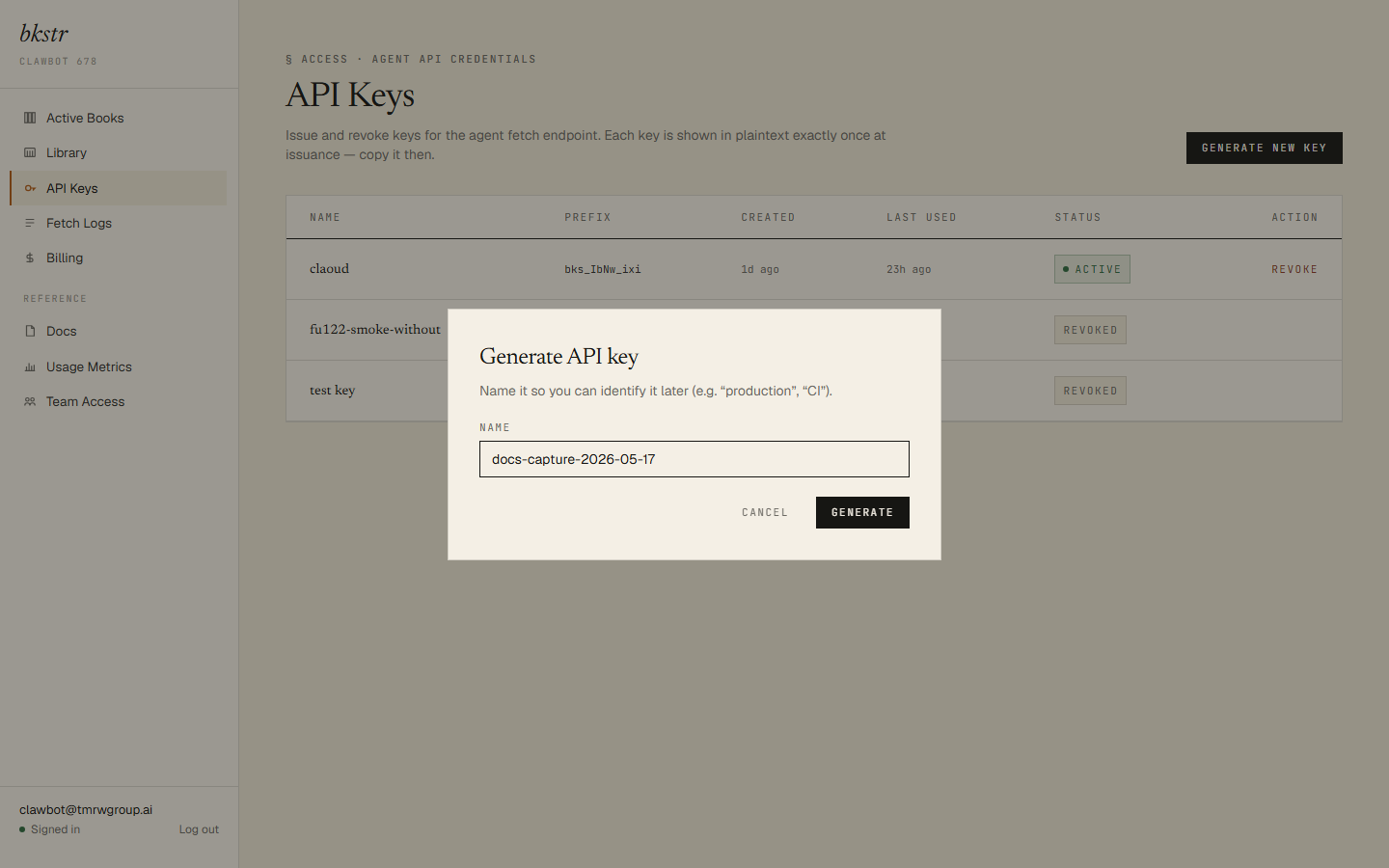
Visit /dashboard/api-keys, click Create new key, give it a label, and copy the bks_… value the dialog shows. The key is shown once — paste it into your shell's BKSTR_KEY environment variable, or hold onto it for the next step.
4. Reconnect, authenticated
Re-run claude mcp add for the same server, this time with --header "Authorization: Bearer $BKSTR_KEY". Claude Code stores the key and attaches it to every request from now on. The bkstr entry in /mcp doesn't change visually — the difference shows up when you call an authenticated tool.
5. List your library and load an item
Ask "what's in my library?" — the agent picks my_library and returns the books and skills you own. Pick one and ask "load it" — the agent picks load_item and the content arrives inline: a book comes back as chapters[], a skill as files[]. The agent reads what it loaded in place.
That's the full end-to-end. If any of the steps above failed, the next section walks the realistic failure modes.
Authentication
Authenticated tools require a bks_ API key in a Bearer header on every JSON-RPC call:
Authorization: Bearer bks_your_key_hereAnonymous tools ignore the header. Authenticated tools without a key return UNAUTHENTICATED; with a key but no grant on the requested item, NOT_OWNED. Keys live at /dashboard/api-keys; revoke a leaked one there and it stops authenticating immediately.
Rate limits
The server enforces two independent budgets. Authenticated tools share one budget per Bearer key — 60 calls per minute, sliding window, enforced in-app. Anonymous tools share a separate budget keyed by client IP at the edge. On exhaustion, the tool returns a RATE_LIMITED error; wait for the window to roll before retrying. Burst-heavy automation should pace itself rather than retry tight.
ask_book and the kill-switch
ask_book proxies to the bkstr Q&A endpoint, which is the one tool with a meaningful per-call cost. Operations can disable it without a redeploy by flipping a single environment flag — when that flag is off, ask_book returns an UPSTREAM error with the message "ask_book is currently disabled by operator configuration", and the other six tools keep working. search_catalog, get_item, get_popular, get_publisher, my_library, and load_item are never gated by the kill-switch.
If ask_book returns the kill-switch message, the Q&A surface is the only thing offline — the rest of bkstr is still up. The same key still loads inline content with load_item.
Troubleshooting
Most failures look the same: the agent shows a tool error with a code and a one-line message. Below are the cases most callers hit, roughly in the order you encounter them.
Client shows the server but no tools. Almost always a transport mismatch. The bkstr MCP server speaks Streamable HTTP, not stdio. Re-check the client config: the URL must be
https://mcp.bkstr.tmrwgroup.ai/mcp(the/mcppath matters), and the transport must be HTTP. In Claude Code that's--transport http; in Cursor and Codex theurlfield implies HTTP for anyhttps://URL.
UNAUTHENTICATEDon an authenticated tool. No Bearer header on the request, or it's malformed. Re-add the server with the--header "Authorization: Bearer bks_…"form (Claude Code) or fill in theheadersblock (Cursor / Codex). Shell-quoting matters — wrap the header value in single quotes if you mean the literal$BKSTR_KEYrather than the expanded value.
NOT_OWNEDwhen loading or asking. Your key is valid; you do not have an active grant on that item. Buy it on the storefront —search_catalogreturns astorefront_urlfor every item, or browse /storefront. After Stripe's webhook fires (usually seconds), the nextmy_librarycall lists the item.
ask_bookreturns "ask_book is currently disabled by operator configuration". The kill-switch is on — see the section above. Not a bug. The other six tools keep working;load_itemreturns the same book inline if you want the content directly.
RATE_LIMITED. Too many calls in too short a window. The authenticated budget is 60 calls per minute per key, sliding window; the anonymous budget is per client IP at the edge. Wait for the window to roll, then retry. If you hit this from automated traffic, pace your calls rather than retry tight.
UPSTREAMon any other tool. A transient failure in the bkstr web app or the Q&A endpoint. Retry once; if it persists, the platform is having a moment — check bkstr.tmrwgroup.ai.
Connection refused or TLS errors. The URL is wrong. It must be exactly
https://mcp.bkstr.tmrwgroup.ai/mcp— HTTPS, themcp.subdomain, and the/mcppath. The bare hostname is not the server; any other path returns 404.
Errors
Every error is a JSON-RPC tool error (isError: true) with a stable code and a human-readable message. The full code set:
| Code | Meaning |
|---|---|
UNAUTHENTICATED | Missing or invalid Bearer key on an authenticated tool. |
NOT_OWNED | Key is valid but the subscriber has no live grant on the item. |
NOT_FOUND | The item or publisher slug does not resolve to an active item. |
RATE_LIMITED | Per-key (authenticated, in-app) or per-IP (anonymous, edge) budget exhausted. |
UPSTREAM | A transient failure in the bkstr web app, the Q&A endpoint, or the ask_book kill-switch path. Retry the call (or wait, in the kill-switch case). |
INTERNAL | An unhandled server fault. Should not be reachable in practice. |
Errors are returned as MCP tool errors, not as JSON-RPC protocol errors — the call itself completes, the result carries the failure. JSON-RPC protocol errors (-32601 unknown method, -32602 invalid params) are reserved for shape problems with the request itself.